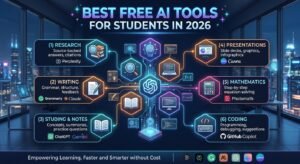
Best Free AI Tools for Students in 2026
Studying in 2026 is very different from the way students studied just a few years ago. Artificial intelligence can now help students understand difficult concepts, summarize notes, research topics, improve writing, create study materials, practice questions, and even get help with coding.
The good news is that students do not necessarily need an expensive AI subscription to get started. Several popular AI platforms offer free tiers or free educational features that can be useful for everyday study. Current 2026 guides continue to highlight tools such as ChatGPT, Gemini, NotebookLM, Perplexity, Claude, Grammarly, and other specialized study tools.
But which tools are actually worth using?
In this guide, we will look at some of the best free AI tools for students in 2026, what each tool is good for, and how students can use AI without becoming dependent on it.
Why Should Students Use AI Tools in 2026?
AI can act like a personal study assistant that is available whenever you need help.
Instead of spending a long time searching for a simple explanation, students can use AI to break difficult subjects into easier steps.
AI Can Help Students With:
- Understanding difficult topics
- Summarizing long notes
- Researching subjects
- Improving grammar
- Creating study plans
- Preparing practice questions
- Making flashcards
- Organizing ideas
- Learning programming
- Preparing presentations
However, AI should be used as a learning assistant, not as a replacement for your own thinking and academic work.
1. ChatGPT – Best All-Purpose AI Tool for Students
ChatGPT is one of the most flexible AI tools available to students.
It can explain complicated subjects in simple language, help students brainstorm ideas, summarize information, create practice questions, and provide feedback on writing.
What Can Students Use ChatGPT For?
Students can use ChatGPT to:
- Explain difficult concepts
- Create study plans
- Generate practice questions
- Summarize notes
- Brainstorm essay ideas
- Improve writing
- Practice languages
- Learn programming
- Prepare for exams
The best way to use it is to ask ChatGPT to teach you, rather than simply asking for the final answer.
Example Prompt
“Explain photosynthesis like I am a beginner, then give me five questions to test my understanding.”
This approach turns AI into a study partner rather than an answer generator.
2. Google Gemini – Great for Research and Study
Google Gemini is another useful AI assistant for students.
It can help with explanations, brainstorming, writing, research, and other everyday academic tasks.
Students who already use Google’s ecosystem may find Gemini particularly convenient for their workflow.
Best Uses of Gemini
- Research assistance
- Writing support
- Brainstorming
- Summarizing information
- Explaining difficult concepts
- Studying different subjects
- Working with Google-related productivity tools
Students should still verify important academic information rather than assuming every AI-generated answer is automatically correct.
3. Google NotebookLM – Excellent for Notes and PDFs
NotebookLM is especially interesting for students because it is designed around the material you provide.
Students can use their own notes, documents, and other supported sources to ask questions and create study materials.
Current 2026 student-tool guides frequently recommend NotebookLM for studying from personal notes and PDFs.
What Can NotebookLM Do?
It can help students:
- Understand uploaded study material
- Summarize documents
- Ask questions about notes
- Create study guides
- Review course material
- Organize information
Why Is NotebookLM Useful?
Imagine you have a long PDF containing your course material.
Instead of reading the entire document again just to find one topic, you can use NotebookLM to ask questions about the material and create a more focused study workflow.
4. Perplexity – Useful for Research
Perplexity is another AI tool worth considering when research is the main goal.
It combines AI-generated responses with web-based information and citations, making it useful when students want to investigate a topic and follow up on sources.
Best Uses of Perplexity
- Academic research
- Finding sources
- Exploring unfamiliar subjects
- Comparing information
- Researching current events
- Getting source-supported answers
Students should still open and read the sources instead of relying only on an AI-generated summary.
5. Claude – Helpful for Writing and Understanding
Claude is another AI assistant that students can use for writing, explanations, document analysis, brainstorming, and coding.
It can be particularly useful when working with long pieces of text or when a student wants detailed explanations.
Claude Can Help With:
- Essay planning
- Writing feedback
- Summarizing documents
- Explaining concepts
- Coding
- Brainstorming
- Editing
A good student workflow is to ask Claude to criticize your draft and suggest improvements, rather than simply asking it to write the entire assignment.
6. Grammarly – Improve Your Writing
Grammarly is useful for students who want to improve their English writing.
It can help identify grammar, spelling, punctuation, clarity, and style problems.
Students Can Use Grammarly For:
- Essays
- Emails
- Reports
- Assignments
- Applications
- Academic writing
- General English practice
Instead of blindly accepting every suggestion, students should understand why a correction is being suggested.
7. Canva – Presentations and Visual Projects
Students often need presentations, posters, diagrams, social media graphics, and other visual materials.
Canva can make this process easier, including through its AI-powered features.
Canva Is Useful For:
- Presentations
- Posters
- Infographics
- Study diagrams
- Project covers
- Educational graphics
- Class presentations
For students who are not experienced designers, Canva can be a particularly easy place to start.
8. GitHub Copilot – Useful for Coding Students
Students studying computer science, software engineering, or programming can benefit from AI coding assistants.
GitHub Copilot can help developers write code, understand code, and work through programming problems.
Coding Students Can Use It For:
- Code suggestions
- Understanding programming concepts
- Debugging
- Repetitive coding tasks
- Exploring different solutions
However, students should understand the code instead of copying it blindly.
If you cannot explain what your program does, you probably have not learned the concept yet.
9. AI Tools for Mathematics
AI-powered mathematics tools can also help students understand equations and mathematical concepts.
Tools such as Photomath and Symbolab are commonly used for solving and explaining mathematical problems, and current 2026 student-tool guides continue to include them among useful free or free-tier options.
How to Use AI for Math
Instead of asking:
“Give me the answer.”
Try:
“Show me the steps and explain why each step is necessary.”
This helps you learn the process rather than simply obtaining the final number.
10. AI Flashcard and Revision Tools
Flashcards are a popular way to prepare for exams.
AI-powered study platforms can help students turn information into questions, answers, quizzes, and revision material.
Some 2026 student-tool roundups highlight tools such as Anki and Knowt for flashcard-based revision.
Flashcards Are Useful For:
- Vocabulary
- Definitions
- Formulas
- Historical dates
- Medical terminology
- Language learning
- Exam revision
The important thing is to review the material regularly rather than creating hundreds of flashcards and never revisiting them.
Best Free AI Tools for Students: Quick Comparison
| AI Tool | Best For | Student Use |
|---|---|---|
| ChatGPT | General study help | Explanations, brainstorming, practice |
| Gemini | Research & productivity | Research and writing |
| NotebookLM | Notes & PDFs | Study material and revision |
| Perplexity | Research | Sources and current information |
| Claude | Writing & analysis | Drafts, explanations, documents |
| Grammarly | Writing | Grammar and clarity |
| Canva | Design | Presentations and graphics |
| GitHub Copilot | Coding | Programming assistance |
| Photomath | Mathematics | Math problems and explanations |
| Anki / Knowt | Revision | Flashcards and memorization |
Note: Free features, usage limits, eligibility, and student offers can change. Always check the tool’s official website before relying on a specific free feature or promotion.
How to Choose the Right AI Tool
You do not need ten different AI subscriptions.
Choose the tool based on what you actually need.
For General Studying
ChatGPT
For Notes and PDFs
NotebookLM
For Research
Perplexity
For Writing
Claude or Grammarly
For Presentations
Canva
For Programming
GitHub Copilot
For Mathematics
Photomath or Symbolab
For Flashcards
Anki or Knowt
Using a small number of tools effectively is usually better than constantly switching between different AI platforms.
How Students Can Use AI Without Cheating
This is one of the most important things students should understand.
AI can be extremely useful for learning, but using AI to complete an assignment and submitting the result as your own work may violate your school’s or university’s academic-integrity rules.
Use AI as a Tutor
Ask AI to explain something you do not understand.
Ask for Feedback
Write your own answer first, then ask AI to identify weaknesses.
Generate Practice Questions
Ask AI to create questions similar to the ones you might see in an exam.
Don’t Blindly Copy AI Answers
AI can make mistakes, even when an answer sounds confident.
Check Your School’s Rules
Different schools and universities have different policies regarding AI.
How to Get Better Results From AI
The quality of the answer often depends on the quality of your prompt.
Instead of asking:
“Explain biology.”
Try:
“I am a first-year university student. Explain cellular respiration in simple language, give me a real-world example, and then create 10 multiple-choice questions for practice.”
The second prompt gives the AI more useful context.
Are Free AI Tools Really Free?
Many AI tools offer free access, but “free” does not always mean unlimited.
Some services have daily usage limits, restricted features, smaller models, or paid upgrades.
Current 2026 guides specifically warn that free tiers have real limits and that students should check what is actually included before depending on a tool.
Therefore, always check:
- What features are free?
- Is there a daily limit?
- Is a student account required?
- Is the offer available in your country?
- Does the free access expire?
Is AI Good for Students?
Yes, when it is used correctly.
AI can make learning more accessible by providing explanations, practice material, writing feedback, research assistance, and personalized study support.
But the goal should be better learning, not less learning.
Recent research into AI-assisted learning also highlights an important distinction between simply retrieving answers and actually engaging with the learning process.
Frequently Asked Questions
What is the best free AI tool for students in 2026?
There is no single best tool for everyone. ChatGPT is a strong general-purpose option, while NotebookLM is particularly useful for studying your own notes and PDFs, and Perplexity is useful for research.
Which AI is best for studying?
ChatGPT and NotebookLM are strong choices for general studying, explanations, revision, and working with study material.
Can students use AI tools for free?
Yes. Many popular AI tools offer free tiers, although features and usage limits vary by service and can change over time.
Which AI tool is best for research?
Perplexity is a useful option for research because it can provide answers with sources. Students should still verify important information using the sources.
Can AI help with exam preparation?
Yes. Students can use AI to create quizzes, practice questions, flashcards, study plans, summaries, and explanations of difficult topics.
Can AI write my assignment?
AI can help you brainstorm, plan, explain concepts, and improve your draft, but you should follow your school’s academic-integrity rules and avoid submitting AI-generated work as your own when prohibited.
Conclusion
The best free AI tools for students in 2026 are not necessarily the ones that simply give the fastest answers.
The most useful tools are the ones that help you understand, practice, research, organize, and improve.
For general study help, ChatGPT and Gemini are useful starting points. NotebookLM can be valuable for working with your own notes and PDFs, while Perplexity can help with research. Claude and Grammarly can support writing, Canva can help with presentations, and coding students can explore tools such as GitHub Copilot.
The smartest approach is to choose a few tools that fit your needs and use them as learning assistants—not replacements for your own thinking.
AI can help you study faster, but learning better should always be the main goal.